
Where players join the queue
Typical connect-screen
During the FiveM connect flow. Adaptive Card, deferral card, or queue NUI while connecting.
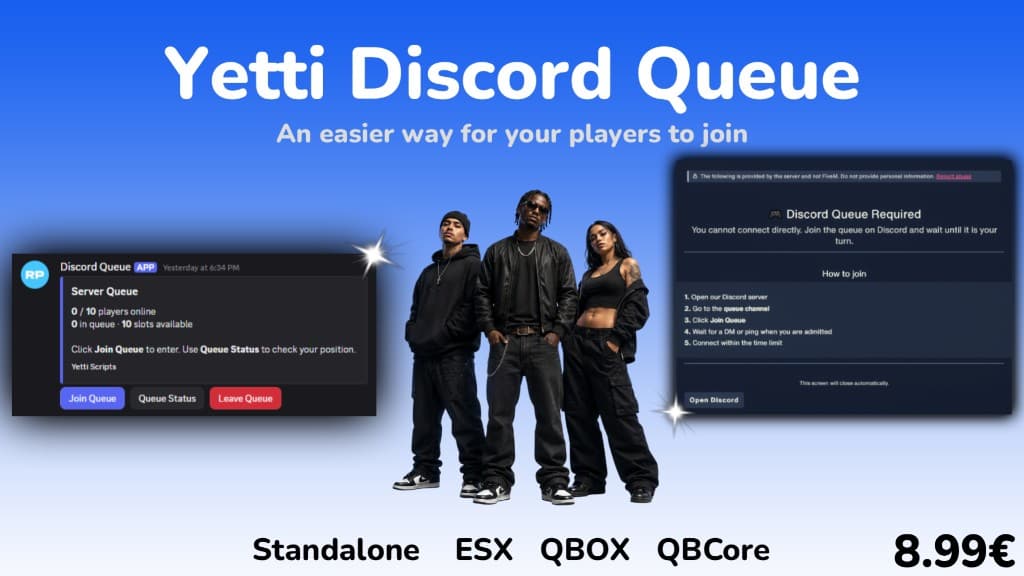
Discord Queue
In a Discord channel via Join Queue on a persistent embed, before FiveM is opened.
yetti_discordqueue
Players join, wait, and connect through your Discord server instead of hammering the connect button.
EUR 8.99
Two ways to handle a full server
Typical approach
Players sit in the FiveM connect flow with a queue card or deferral screen. They wait on their PC while the server is full.
This script
Players queue in Discord from phone or PC, get pinged when it is their turn, and only launch FiveM when admitted.
Most FiveM queues run during the connect flow. yetti_discordqueue moves the line into Discord so players can join before opening FiveM.
Typical connect-screen
During the FiveM connect flow. Adaptive Card, deferral card, or queue NUI while connecting.
Discord Queue
In a Discord channel via Join Queue on a persistent embed, before FiveM is opened.
Typical connect-screen
No. The player is already in the connect attempt on their PC.
Discord Queue
Yes. Join, check status, and leave the queue from Discord on mobile or desktop.
Typical connect-screen
Queue position and status update in the connect screen UI.
Discord Queue
Discord DM and channel ping with a Connect to Server button.
Typical connect-screen
Often supported. Roles can bump queue position or gate access during connect.
Discord Queue
Yes. Roles grant priority points in config.lua. Multiple roles can stack.
Typical connect-screen
Some setups reserve slots for staff or high-priority roles. Others use priority tiers only.
Discord Queue
Reserved slots for staff or specific Discord IDs in config, separate from the public queue.
Typical connect-screen
Players who stop responding in the connect flow may be kicked after a timeout.
Discord Queue
Timed admission window when called. If they miss it, the next player is notified automatically.
Typical connect-screen
Player stays in the FiveM connect or loading flow.
Discord Queue
FiveM can stay closed. Players can do something else until they are admitted.
Typical connect-screen
Most Discord-integrated queues still need a bot app for roles, whitelist, or priority.
Discord Queue
Bot runs inside FXServer with the resource. No separate Node hosting setup.
Join Queue, Queue Status, and Leave Queue buttons in your Discord channel.
Discord roles grant priority points. Points stack across multiple roles.
Players get a window to connect. Miss it and the next player is notified.
Direct FiveM connects are rejected when full. In-game deferral cards guide players.
Hold slots for staff, owners, or specific Discord IDs in config. Separate from the public queue count.
Disconnecting players re-enter the queue with priority for a configurable grace period.
Step 1
Player clicks Join Queue in your Discord channel.
Step 2
Queue Status shows their place. Priority roles move them up.
Step 3
DM and channel ping when it is their turn.
Step 4
Connect to Server button opens cfx.re when admitted.
Step 1
Add a bot application in the Discord Developer Portal and invite it with the permissions from the install guide.
Step 2
Install yetti_discordqueue, ox_lib, and oxmysql. Add the bot token and channel IDs to config.lua.
Step 3
Run the setup command once. Players use Join Queue on the embed instead of hammering connect.
Step 4
The bot starts with FXServer. Full servers now send players to Discord first.
Discord Queue
EUR 8.99